* @copyright (c) 2014, OnePress Ltd
*
* @package core
* @since 1.0.0
*/
/**
* Common Settings
*/
class OPanda_HowToUsePage extends FactoryPages321_AdminPage {
public $menuPostType = OPANDA_POST_TYPE;
public $id = "how-to-use";
public function __construct(Factory325_Plugin $plugin) {
parent::__construct($plugin);
$this->menuTitle = __('How to use?', 'bizpanda');
}
public function assets($scripts, $styles) {
$this->scripts->request('jquery');
$this->styles->add(OPANDA_BIZPANDA_URL . '/assets/admin/css/howtouse.030100.css');
$this->styles->request('bootstrap.core', 'bootstrap');
}
protected $_pages = false;
/**
* Returns an array of the pages of the section 'How to use?'.
*
* @since 1.0.0
* @return mixed[]
*/
protected function getPages() {
if ( $this->_pages !== false ) return $this->_pages;
$items = array(
array(
'name' => 'social-apps',
'title' => __('Creating Social Apps', 'bizpanda'),
'hollow' => true,
'items' => array(
array(
'name' => 'facebook-app',
'title' => __('Creating Facebook App', 'bizpanda')
),
array(
'name' => 'twitter-app',
'title' => __('Creating Twitter App', 'bizpanda')
),
array(
'name' => 'google-client-id',
'title' => __('Getting Google Client ID', 'bizpanda')
)
)
),
array(
'name' => 'zapier',
'title' => __('Zapier Integration', 'bizpanda')
),
array(
'name' => 'troubleshooting',
'title' => __('Troubleshooting', 'bizpanda')
)
);
$items[0]['items'][] = array(
'name' => 'linkedin-api-key',
'title' => __('Getting LinkedIn API Key', 'bizpanda')
);
$this->_pages = apply_filters( 'opanda_help_pages', $items );
return $this->_pages;
}
/**
* Returns a current page name.
*
* @since 1.0.0
* @return string The current page name or null.
*/
protected function _getCurrentPageName() {
if ( isset( $_GET['onp_sl_page'] ) ) return $_GET['onp_sl_page'];
$pages = $this->getPages();
return $pages[0]['name'];
}
/**
* Returns a parent page name of the current page.
*
* @since 1.0.0
* @return string|null A page name of the current parent page or null.
*/
protected function _getCurrentParentPage() {
$current = $this->_getCurrentPageName();
$page = $this->getPageData( $current );
if ( $page ) return $page['parent'];
return null;
}
/**
* Returns data of the specified page, including the parent page name.
*
* @since 1.0.0
* @return mixed[]|null The page data or null.
*/
protected function _getPageData( $name, $parent = null, $haystack = null ) {
$haystack = ( empty( $haystack ) ) ? $this->getPages() : $haystack;
foreach( $haystack as $page ) {
if ( $page['name'] == $name ) {
$page['parent'] = $parent['name'];
return $page;
}
if ( isset( $page['items'] ) ) {
$result = $this->_getPageData( $name, $page, $page['items'] );
if ( $result ) return $result;
}
}
return null;
}
/**
* Gets the full path (which includes all parent pages) to a given page.
*
* @param type $pageName A page name to return the full path.
* @return mixed[] The navigation branch.
*/
protected function _getPageTree( $pageName = null ) {
if ( empty( $pageName ) ) $pageName = $this->_getCurrentPageName();
$tree = array();
$pageNameToSearch = $pageName;
while( true ) {
$pageData = $this->_getPageData( $pageNameToSearch );
if ( empty( $pageData ) ) break;
$tree[] = $pageData['name'];
if ( empty( $pageData['parent']) ) break;
$pageNameToSearch = $pageData['parent'];
}
return $tree;
}
/**
* Renders the navigation.
*
* @since 1.0.0
* @return void
*/
protected function _renderNav( $currents = array() ) {
$pages = $this->getPages();
$index = 1;
?>
_renderNavItem( $item, 0, $currents );
} ?>
getActionUrl('index', array('onp_sl_page' => $item['items'][0]['name'] ) )
: $this->getActionUrl('index', array('onp_sl_page' => $item['name'] ) );
?>
_renderNavItem( $subItem, $level, $currents ); } ?>
current : $page;
if ( empty( $page) ) return;
$data = $this->_getPageData( $page );
if ( empty( $data['items']) ) return;
?>
current = $this->_getCurrentPageName();
$this->currents = $this->_getPageTree();
add_action('opanda_help_page_facebook-app', array($this, 'facebookApp' ));
add_action('opanda_help_page_twitter-app', array($this, 'twitterApp' ));
add_action('opanda_help_page_google-client-id', array($this, 'googleClientId' ));
add_action('opanda_help_page_linkedin-api-key', array($this, 'linkedinApiKey' ));
add_action('opanda_help_page_troubleshooting', array($this, 'troubleshooting' ));
add_action('opanda_help_page_zapier', array($this, 'zapier' ));
?>
_renderNav( $this->currents ) ?>
knowledge base. It is possible that instructions for resolving your issue have already been posted.', 'bizpanda'); ?>
here.
You can also email us directly support@byonepress.com', 'bizpanda'); ?>
pluginName, false);
?>
Opt-In Panda plugin.
We offer you to try the premium version for 7 days absolutely for free. We sure you will love it.', 'bizpanda'), onp_licensing_325_get_purchase_url( $this->plugin ) ) ?>
Opt-In Panda plugin sold on CodeCanyon.', 'bizpanda') ?>
Comparison of Free & Premium Versions
Click on the dotted title to learn more about a given feature.
Upgrade To Premium and get all the following features:
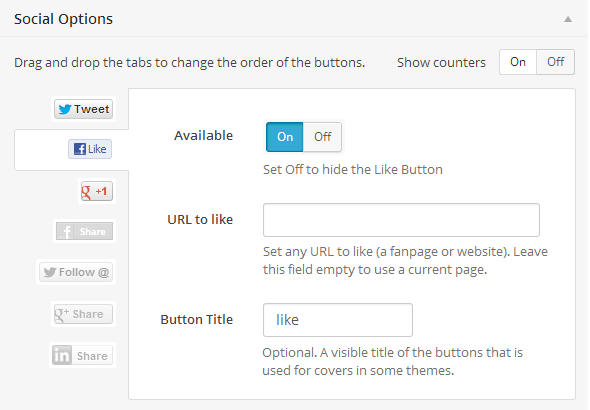
For example, you can set up the locker to get followers your Twitter account, fans for your Facebook page, +1s for a home page of your website.', 'bizpanda') ?>
The previous versions of the plugin allowed only to hide the locked content totally. But recently we have added the long-awaited option to overlap content and make it transparent or blurred.
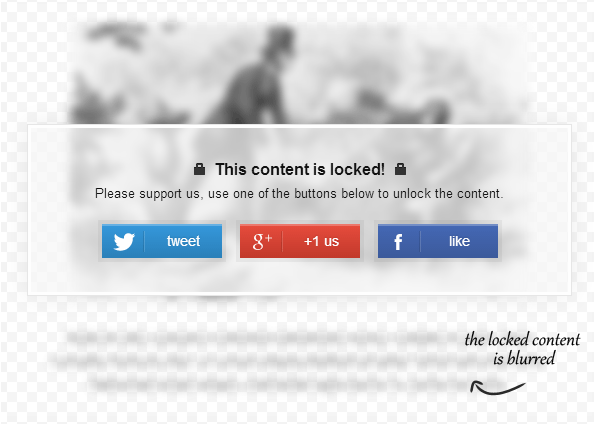
When we tested this feature on sites of some our customers, we were blown away how this feature attracts attention of the huge number of visitors. If people see and understand that they will get after unlocking, the plugin works more effectively.
We release about 3-4 updates each month, adding new features and fixing bugs. The Free version does not guarantee that you will get all the major updates. But if you upgrade to the Premium version, your copy of the plugin will be always up-to-date.
All of our plugins come with free support. We care about your plugin after purchase just as much as you do. We want to make your life easier and make you happy about choosing our plugins.
Unfortunately we receive plenty of support requests every day and we cannot answer to all the users quickly. But for the users of the premium version (and the trial version), we guarantee to respond to every inquiry within 1 business day (typical response time is 3 hours).
'Creating Facebook App'
*
* @since 1.0.0
* @return void
*/
public function facebookApp() {
require OPANDA_BIZPANDA_DIR . '/admin/pages/how-to-use/facebook-app.php';
}
/**
* Page 'Creating Social Apps' => 'Creating Twitter App'
*
* @since 1.0.0
* @return void
*/
public function twitterApp() {
require OPANDA_BIZPANDA_DIR . '/admin/pages/how-to-use/twitter-app.php';
}
/**
* Page 'Creating Social Apps' => 'Getting Google Client ID'
*
* @since 1.0.0
* @return void
*/
public function googleClientId() {
require OPANDA_BIZPANDA_DIR . '/admin/pages/how-to-use/google-app.php';
}
/**
* Page 'Creating Social Apps' => 'Getting LinkedIn API Key'
*
* @since 1.0.0
* @return void
*/
public function linkedinApiKey() {
require OPANDA_BIZPANDA_DIR . '/admin/pages/how-to-use/linkedin-app.php';
}
/**
* Page 'Important Notes'
*
* @since 1.0.0
* @return void
*/
public function notes() {
require OPANDA_BIZPANDA_DIR . '/admin/pages/how-to-use/notes.php';
}
/**
* Page 'Important Notes' => 'Using the Facebook Like with the Social Locker'
*
* @since 1.0.0
* @return void
*/
public function facebookLike() {
require OPANDA_BIZPANDA_DIR . '/admin/pages/how-to-use/facebook-like.php';
}
/**
* Page 'SSL Certificate'
*
* @since 1.0.0
* @return void
*/
public function ssl() {
require OPANDA_BIZPANDA_DIR . '/admin/pages/how-to-use/ssl.php';
}
/**
* Page 'Zapier Integration'
*
* @since 1.0.0
* @return void
*/
public function zapier() {
require OPANDA_BIZPANDA_DIR . '/admin/pages/how-to-use/zapier.php';
}
}
FactoryPages321::register($bizpanda, 'OPanda_HowToUsePage');
For example, you can set up the locker to get followers your Twitter account, fans for your Facebook page, +1s for a home page of your website.', 'bizpanda') ?>